Posts

Showing posts with the label #System tools

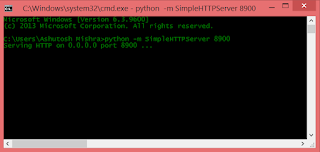
Basic Web Server (On the fly Creation)
Image
Hello World, Many times specially during web development on core HTML 5[although its not just limited here only.], we need a web server to test the application and specially JavaScript and other features of html 5, which are only available on localhost,HTTP. Now, here you can go with traditional web servers like Tomcat Apache or any other server, but then you need to configure them accordingly and very carefully and that may took very dedicated time around 00:30 mins to 1 hour [i am talking here about very basic web server]. So, is there any techniques that can help us to creating a web server in just a simple one line command hit... Yes there is. actually there are many server framework that are just a few line setup away to have a basic web server. Here i gonna talk very simplest one, that will help us to create a very basic web server. And it is Python's module "SimpleHTTPServer". Dependency/Requirement: But there is a very small dependency to have you on y...

JSP Database Connectivity with MySQL

Image
Hi Folks, Steps for Creating Connection with MySQL and JSP 1-  Download MySQL Driver Jar file and paste it to:                                    > c:\Program Files\java\jre1.8.0\lib\ext\ 'driver'.jar                                   > Tomcat_Server_Location\lib\ 'driver'.jar 2- Write your code to connect 3- Output and thats all. you are set to go. Note: Here in step 2 image, i wrote code for displaying data on the console but you can write you own code to display data on the webpage.

Shortcut Keys for Windows [8/8.1/10]

Here are some shortcut keys for your windows computer for doing things more faster and smarter. 1- Window key + PauseBreak  ---------> System Information 2- Ctrl+Shift+N ---------------------------> Creates new Folder 3- Alt+Left Shift+PrintScreen-----------> open Sticky Keys dialog 4- F11 ---------------------------------------> Full Screen [for HTML pages or windows Explorer]
Basic Shortcut Keys The followings are some basic PC shortcut keys that are supported in most IBM compatible computers. They are also supported in most application software. Use at your own risk. Shortcut Keys Supported Window Versions Description Alt + e 95, 98, ME, NT, 2000, XP, Vista Pull down the top Edit menu. Alt + f 95, 98, ME, NT, 2000, XP, Vista Pull down the top File menu Ctrl + a 95, 98, ME, NT, 2000, XP, Vista Select all text. Ctrl + c 95, 98, ME, NT, 2000, XP, Vista Copy selected item(s) (to clipboard). Ctrl + f 95, 98, ME, NT, 2000, XP, Vista Find. Ctrl + v 95, 98, ME, NT, 2000, XP, Vista Paste copied item(s) from clipboard Ctrl + x 95, 98, ME, NT, 2000, XP, Vista Cut. Ctrl + Ins 95, 98, ME, NT, 2000, XP, Vista Same as Ctrl + c Ctrl + (left arrow) 95, 98, ME, NT, 2000, XP, Vista Move one word to the left at a time. Ctrl + (...