Posts

Showing posts with the label #Howto

Print emojis using python (😀, 👍, ...)

Image
Hello World, Everyone of us usage the emojis at some point, because its quiet expressive. and when you are a programmer then it becomes more curious to print emoji characters out. I thought of printing emojis out for the logs , most of the time when I used to print the logs specially for the errors or exception message then I always try to express the message with more expression .  Well, you can print emojis using python as well. For that we can follow one of the following things: 1- Unicodes 2- Library 1- Unicodes: There are unicodes for every single character that is going to be printed out and that's why there are unicodes for the emojis too. For example : Unicode for thumbs up is "U+1F44D" which in python is going be be as "U0001F44D". As you have noticed that we are replacing "+" with "000", and not only that we also append "\" in front of this unicode while printing. So finally the thumb up emoji can be printed with : print(...

Scraping with Python

Hello World, There is more information on the Internet than any human can absorb in a lifetime. What you need is not access to that information, but a scalable way to collect, organize, and analyze it.  Then, You need web scraping.   So let's discuss this scrapping thing. Now, the Scrap Means: to take out something from somewhere and If we add 'web' to it, then it means to take out something from the web resources.  Web scraping automatically extracts data and presents it in a format you can easily make sense of. In this tutorial, we’ll focus on its applications in the webpage data extraction, but web scraping can be used in a wide variety of situations. Roadmap for this blog: - Setup with the tools and library - Basic of the HTML DOM - Scrapping Rule - Coding part Pre-Requisite: - A basic understanding of programming concept in python ---------------------------------------------------------- Getting Started with the tool...

Jenkins Pipeline

Hello World, Since we know, what is Jenkins and how to use it  So  let's talk about its plugin called "Jenkins Pipeline". If you missed the blog post about the Jenkins then you can access and read from here . What is it? Official definition: Jenkins Pipeline (or simply "Pipeline" with a capital "P") is a suite of plugins which supports implementing and integrating  continuous delivery pipelines  into Jenkins. Explanation:   So from the above official definition, we can conclude that Jenkins pipeline helps us to integrate multiple jobs into one Jenkins job and since all job are interconnected(which also known as  Stage ) so we can get the job outcome for those, based on that we can take further decision. So overall, It helps us to track the multiple stages. -------------------------------------------------------------- Where to and Who can use? Area of use:   Since Jenkins is a DevOps tool, which can automate the repetitive...

Re-Use your maven project into another maven project

Image
Hello World, Once I needed to use one of my ongoing java+maven projects into another java+maven project as its dependency.  So I decided to publish the work, that I did to solve my problem. So, just to give you a quick picture of the problem, the following is the flow/requirement: So to use your already existing java+maven project, you have to just add the reference of it in your new project's POM.xml file as follows:             And, in your existed project POM file add a 'Maven Jar Plugin' under build                And,  Now you build/Install("mvn clean install") your existing project to get the jar in the following directory location: "path_to_m2/repository/groupID /artifactID /version /* -test-jar.jar" and you are ready to go.

Test Automation Infrastructure

Image
Hello World, Test Automation infrastructure, When we move towards the automation in testing, then it's better to have a good automation infrastructure to support our automation testing CI/CD and reporting. Now, you might ask questions like, - Why we would be needing an infrastructure in automation? - Is it necessary to have an infrastructure? - How it will be helpful? - Will it be useful? - Will it require maintenance? and a lot of question like above. So let's discuss these questions. Why we would be needing an infrastructure in automation? Well before answering this question directly, we need to understand what does infrastructure mean?  So Infrastructure is defined and structured approach to deal with any technological problem, hence infrastructure is a solution to solve the technological integration and its management. Is it necessary to have an infrastructure? So, although it is not necessary to have proper infrastructure, but consider this, If we would b...

Jenkins Job Build for Maven and Cucumber

Image
Hello World, Moto:  In Jenkins, we all might be having a question which is,  "How to customize the Jenkins job build with the parameters" In this blog, we will see the build strategy configuration for the Jenkins job for Maven and cucumber automation project. Platform: Jenkins 2.121.3 Plugin(s):   Active Choices Parameter , Active Choices Reactive Parameter Solution: Step 1: Create 3 variables (1- Active Choices Parameter, 2- Active Choices Reactive Parameter) Step 2: Let's say those variables are the 'BuildStrategy'(Active Choice Parameter), 'Options' (Active Choice Reactive Parameter) , and 'Execute' (Active Choice Reactive Parameter) Step 3: Inject the groovy script for all variables accordingly, as shown below For 'BuildStrategy' inject this return ["Build Complete Suite:selected", "Build only selected features", "Build with custom provided tags"] For 'Options' inject...

How to Add Unpacked Chrome Extension

Image
Hello World, Here we will learn about adding an unpacked chrome extension. So let's know first, what is "Unpacked Chrome Extension" and "Packed Chrome Extension"? 1-Unpacked Chrome Extension: A source/codebase with the directory structure for chrome extension, is known as an Unpacked Chrome extension. 2-Packed Chrome Extension: A file having extension "crx" with it is known as a packed chrome extension. For Example:  MyChromeExtension.crx is a packed chrome extension, whereas all the codebase with directory structure is an unpacked chrome extension. Okay,  So why we do packing of extension ?. Well, its very simple, for easiness to its users. Just like as we do create "jar" file (container for the bunch of classes) which could be easily used. packing converts all codebase(which may include several files) into a single unit, and it makes it handy. So let's start with #HOW_TO_ADD_UNPACKED_CHROME_EXTENSION... You have to...

Feature file(s) Execution in Cucumber

Hello World, On this post, we will understand the Execution of the cucumber's feature file(s). Normally we just create the feature file according to the application's feature/main_functional_category and most of the time(basically depending on our automation framework) its just independent from other features. But, what if...if we want to execute our cucumber framework with a proper defined sequence of feature files ? Now this situation arise when we are having following case: the features(or the steps inside features) are inter-related. Or, we just want to execute them as we want to. So, basically cucumber has its own default way to pickup the feature file for execution, which is of-course Alphabetical order (it also applied to sub-folder names) . But we can also override this default method of feature file selection for execution. So below are the methods/ways to override the default way of cucumber feature files... #1: Specify in @ CucumberOptions (or...

Basic Web Server (On the fly Creation)

Image
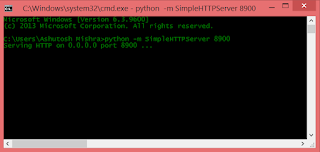
Hello World, Many times specially during web development on core HTML 5[although its not just limited here only.], we need a web server to test the application and specially JavaScript and other features of html 5, which are only available on localhost,HTTP. Now, here you can go with traditional web servers like Tomcat Apache or any other server, but then you need to configure them accordingly and very carefully and that may took very dedicated time around 00:30 mins to 1 hour [i am talking here about very basic web server]. So, is there any techniques that can help us to creating a web server in just a simple one line command hit... Yes there is. actually there are many server framework that are just a few line setup away to have a basic web server. Here i gonna talk very simplest one, that will help us to create a very basic web server. And it is Python's module "SimpleHTTPServer". Dependency/Requirement: But there is a very small dependency to have you on y...

JSP Database Connectivity with MySQL

Image
Hi Folks, Steps for Creating Connection with MySQL and JSP 1-  Download MySQL Driver Jar file and paste it to:                                    > c:\Program Files\java\jre1.8.0\lib\ext\ 'driver'.jar                                   > Tomcat_Server_Location\lib\ 'driver'.jar 2- Write your code to connect 3- Output and thats all. you are set to go. Note: Here in step 2 image, i wrote code for displaying data on the console but you can write you own code to display data on the webpage.

Django [Getting started with Django]

Image
1- Django (What is it ???) Django  is a free and open source web application framework, written in Python. A web framework is a set of components that helps you to develop websites faster and easier. Django Official websites 2- Requirement Tools and Installation of Django Since django is a python framework, so you suppose to have python installed in your machine.  if  you dont have python then go pythons official site and download it. To check into your system for python installation use the following command: > python --version Installing Django by command prompt :> pip install django=1.6.5 3- Setting Up Django making a new project under django serer  :> django-admin.py startproject <your_project_name> Syncing/creating with Database and setting up a user and password for admin login control   :> manage.py syncdb Starting up the Django Server :> manage.py runserver no...